> ## Documentation Index
> Fetch the complete documentation index at: https://octanist.com/docs/llms.txt
> Use this file to discover all available pages before exploring further.
# Form mapping
> Review AI suggested form mappings so Octanist can turn submissions into leads.
Form mapping tells Octanist which fields in a submitted website form should become lead data.
Use this after Octanist detects a form submission and uses AI to suggest how that form should be handled. You review the suggestion, then choose whether the form should create leads or be denied.
## How it works
1. Submit a lead form on the website once.
2. Octanist detects the form submission.
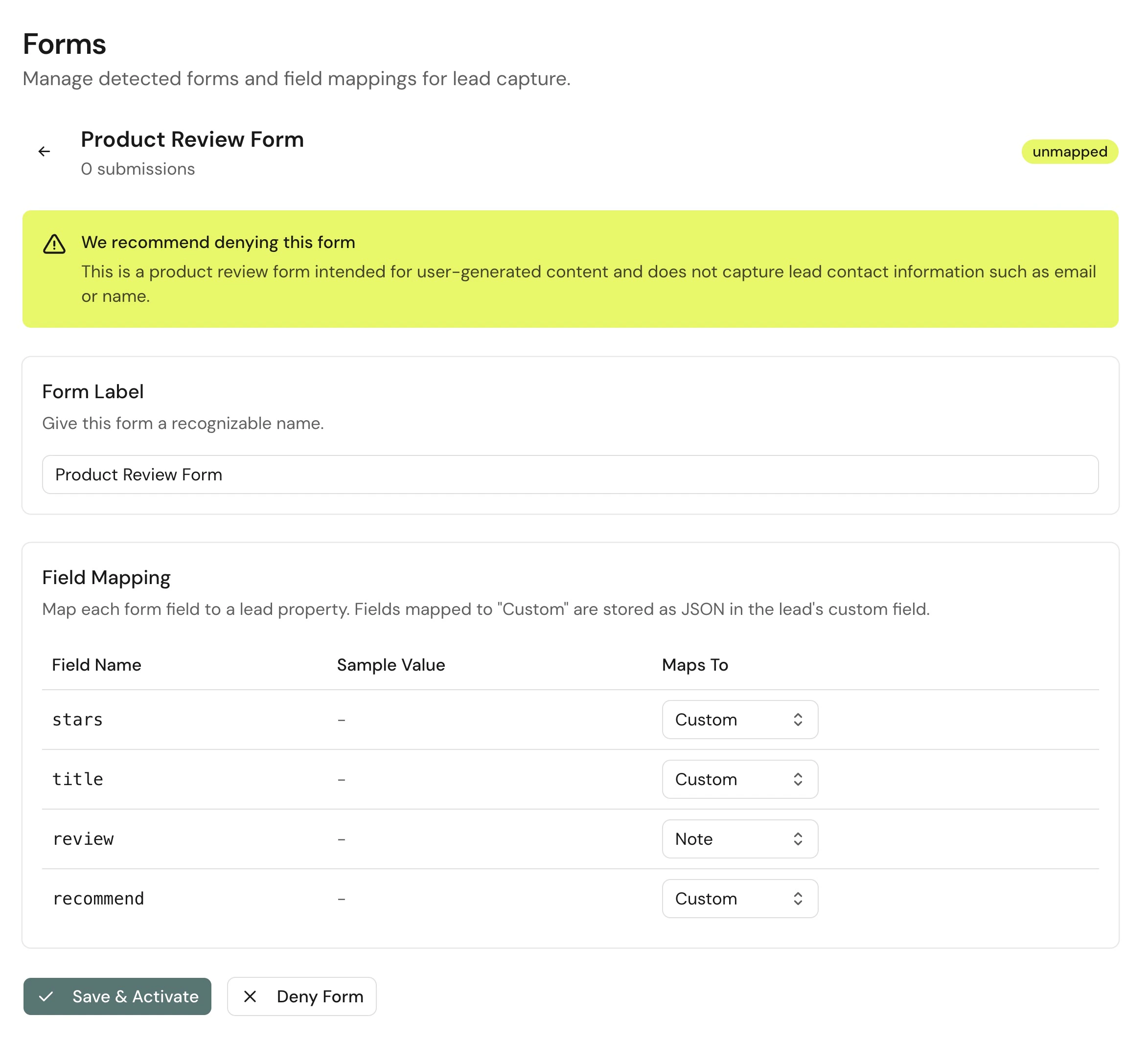
3. Octanist uses AI to suggest the field mapping, or recommends denying the form when it does not look like a lead form.
4. The form appears in **Settings > Forms**.
5. You review the suggestion and adjust it if needed.
6. You either activate the form or deny it.
7. Active forms create future leads with attribution.
## Submit an example form
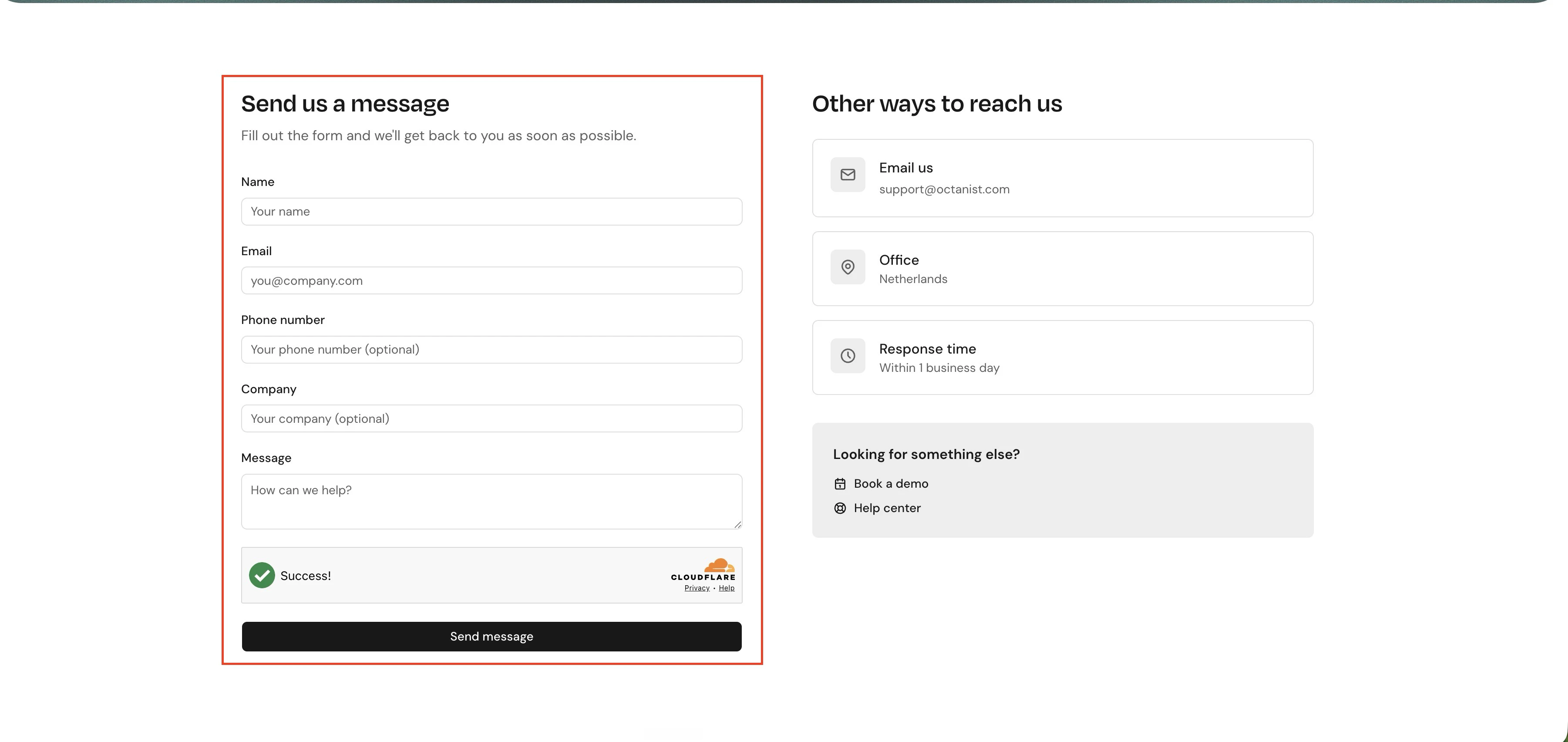
Start by submitting the form that should create leads. This example is a lead form on the Octanist website that needs to be mapped.
 ## Open form mapping
1. Open Octanist.
2. Go to **Settings > Forms**.
3. Open a form marked **Needs mapping**.
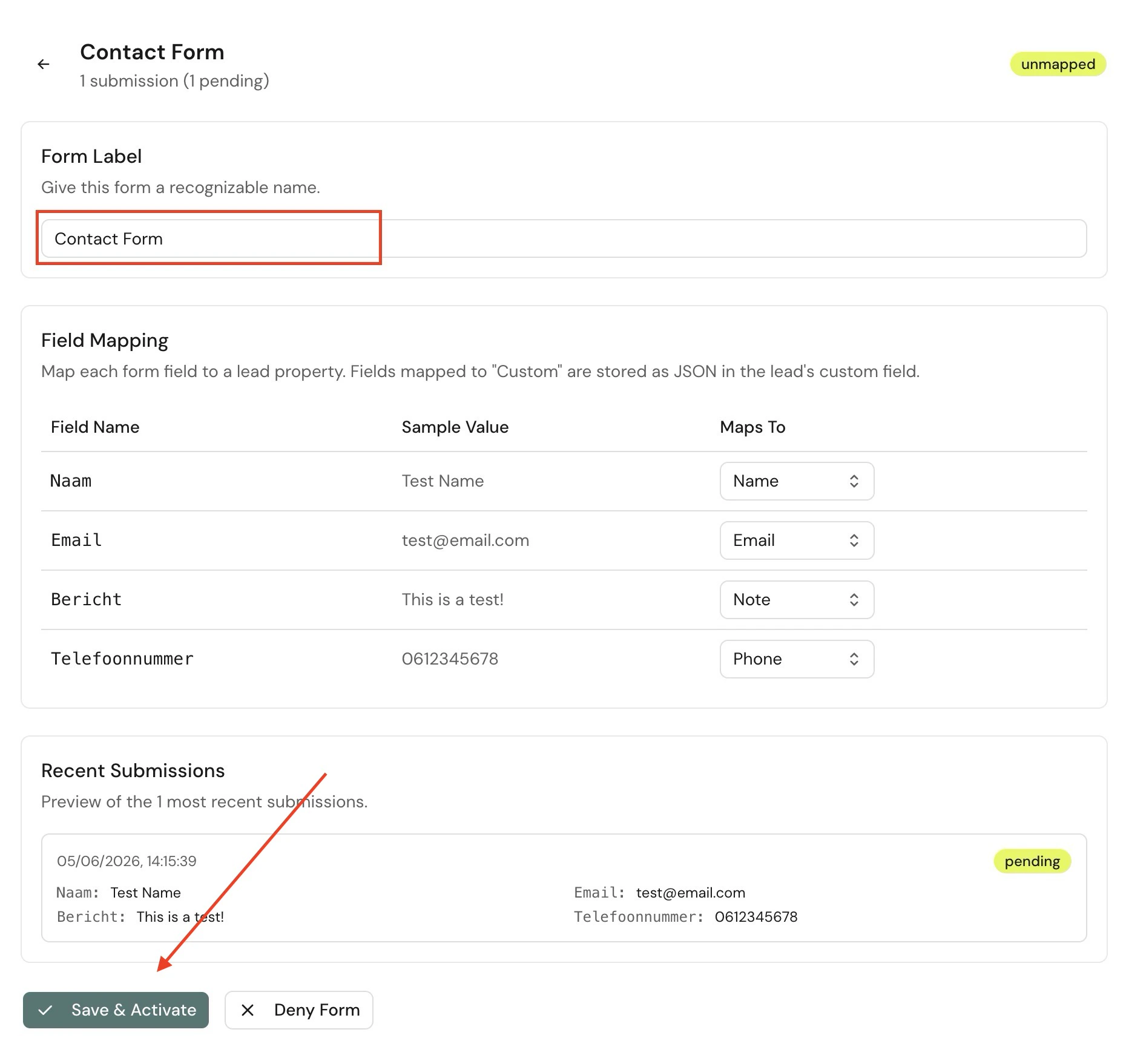
4. Review the suggested mapping and the sample fields.
## Open form mapping
1. Open Octanist.
2. Go to **Settings > Forms**.
3. Open a form marked **Needs mapping**.
4. Review the suggested mapping and the sample fields.
 ## Map fields
Octanist suggests a target for each detected field. Check the suggestion before saving. Each field can be mapped to one of these targets:
| Target | Use for |
| ---------------- | ----------------------------------------------------------------------------------------------------------------------------- |
| External lead ID | A stable customer-owned record ID, such as an order number, quotation number, application ID, opportunity ID, or CRM lead ID. |
| Email | The lead's email address. |
| Phone | The lead's phone number. |
| Name | The lead's name. |
| Note | Message fields or long free-text fields. |
| Custom | Useful extra fields that should be stored on the lead. |
| Ignore | Fields that should not be saved. |
## Map fields
Octanist suggests a target for each detected field. Check the suggestion before saving. Each field can be mapped to one of these targets:
| Target | Use for |
| ---------------- | ----------------------------------------------------------------------------------------------------------------------------- |
| External lead ID | A stable customer-owned record ID, such as an order number, quotation number, application ID, opportunity ID, or CRM lead ID. |
| Email | The lead's email address. |
| Phone | The lead's phone number. |
| Name | The lead's name. |
| Note | Message fields or long free-text fields. |
| Custom | Useful extra fields that should be stored on the lead. |
| Ignore | Fields that should not be saved. |
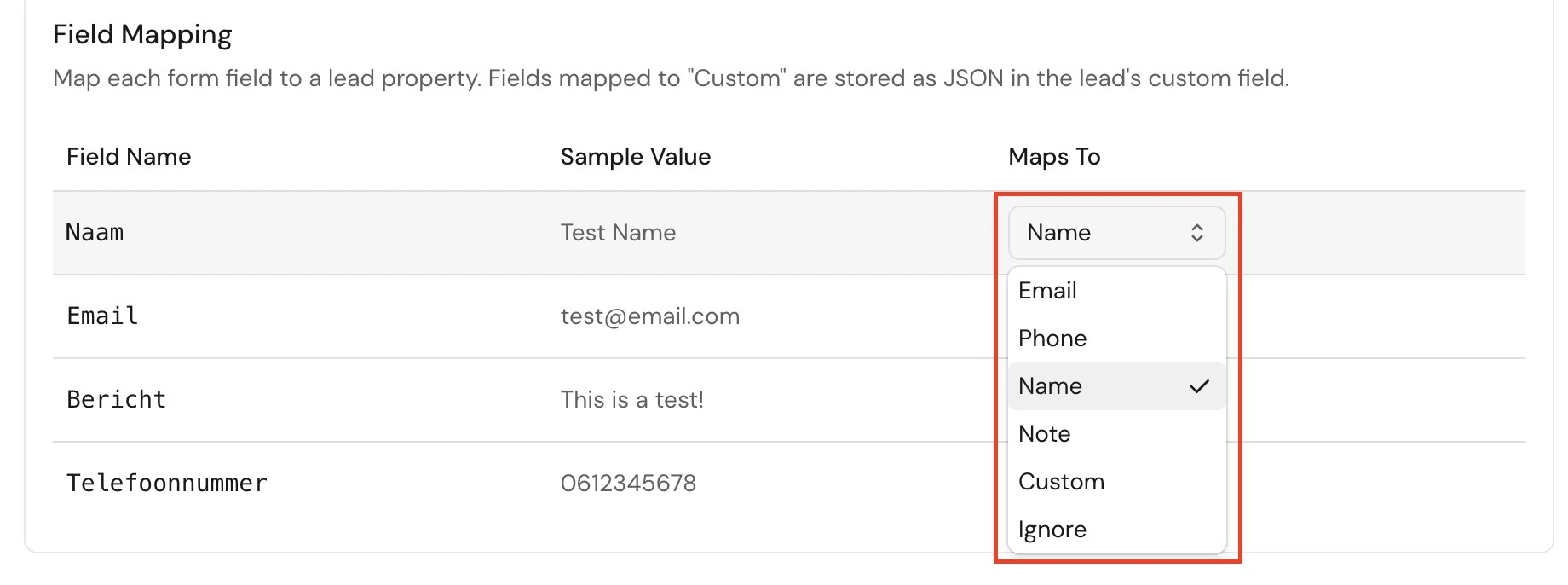 External lead ID, email, and phone should normally only be mapped once. If Octanist shows a duplicate warning, choose the best field and set the other one to **Custom** or **Ignore**.
External lead IDs are trimmed, can contain up to 255 characters, and must be unique within your organization. Do not map click IDs, session IDs, form IDs, analytics IDs, or other technical tracking values to **External lead ID**. Octanist's AI only suggests this mapping when a field clearly looks like a customer-owned business record identifier.
## Save and activate
When the suggested mapping is correct:
1. Give the form a recognizable label.
2. Click **Save & Activate**.
3. If there are pending submissions, choose whether to convert them using the new mapping.
Pending submissions are form submissions Octanist stored before the form was mapped. Converting them can create leads from earlier submissions.
## Ignore a form
Use **Deny Form** when Octanist recommends denying a form, or when you decide that a detected form should never create leads. Examples:
* Search forms
* Login forms
* Newsletter forms that should not enter the lead workflow
* Internal or test forms
When a form is denied, existing stored submissions for that form are deleted and future submissions are dropped.
External lead ID, email, and phone should normally only be mapped once. If Octanist shows a duplicate warning, choose the best field and set the other one to **Custom** or **Ignore**.
External lead IDs are trimmed, can contain up to 255 characters, and must be unique within your organization. Do not map click IDs, session IDs, form IDs, analytics IDs, or other technical tracking values to **External lead ID**. Octanist's AI only suggests this mapping when a field clearly looks like a customer-owned business record identifier.
## Save and activate
When the suggested mapping is correct:
1. Give the form a recognizable label.
2. Click **Save & Activate**.
3. If there are pending submissions, choose whether to convert them using the new mapping.
Pending submissions are form submissions Octanist stored before the form was mapped. Converting them can create leads from earlier submissions.
## Ignore a form
Use **Deny Form** when Octanist recommends denying a form, or when you decide that a detected form should never create leads. Examples:
* Search forms
* Login forms
* Newsletter forms that should not enter the lead workflow
* Internal or test forms
When a form is denied, existing stored submissions for that form are deleted and future submissions are dropped.
 ## Troubleshooting
* Confirm the pixel is installed on the page.
* Confirm form capture is enabled for the setup you use.
* Submit the form once with test data.
* Check the [Octanist Debugger](/docs/troubleshooting/octanist-debugger) Forms tab.
* Open **Settings > Forms**.
* Check whether the form is mapped.
* Confirm the missing field is mapped to External lead ID, Email, Phone, Name, Note, or Custom.
* Submit a new test form after saving changes.
* Open the detected form.
* Use **Deny Form** for forms that should not create leads.
* Search, login, checkout, and account forms should usually be ignored.
## Troubleshooting
* Confirm the pixel is installed on the page.
* Confirm form capture is enabled for the setup you use.
* Submit the form once with test data.
* Check the [Octanist Debugger](/docs/troubleshooting/octanist-debugger) Forms tab.
* Open **Settings > Forms**.
* Check whether the form is mapped.
* Confirm the missing field is mapped to External lead ID, Email, Phone, Name, Note, or Custom.
* Submit a new test form after saving changes.
* Open the detected form.
* Use **Deny Form** for forms that should not create leads.
* Search, login, checkout, and account forms should usually be ignored.