> ## Documentation Index
> Fetch the complete documentation index at: https://octanist.com/docs/llms.txt
> Use this file to discover all available pages before exploring further.
# Google Analytics 4
> Send your closed, open, and converted leads to Google Analytics 4 to track their origins.
## Table of Contents
1. [Overview](#1-overview)
2. [How the Measurement Protocol Works](#2-how-the-measurement-protocol-works)
3. [Setup Instructions](#3-setup-instructions)
4. [Additional Reporting in Google Analytics 4](#4-additional-reporting-in-google-analytics-4)
## Setup Video
Need help setting up offline conversion tracking for GA4? \
Watch the video below, it explains all the steps in detail:
## 1. Overview
The Google Analytics 4 (GA4) integration sends your marked closed, open, and converted leads to Google Analytics 4. This process uses the [Google Analytics 4 Measurement Protocol](https://developers.google.com/analytics/devguides/collection/protocol/ga4). This server-to-server solution ensures all quantitative lead data is sent to Google Analytics 4 and tied to specific channels. No personal or client data is sent to Google Analytics 4.
**Note:** While the Measurement Protocol sends 100% of the data to Google Analytics 4, it may face challenges linking data back to a user or session. The handling of the Client ID and Session ID is managed by Octanist. Events sent through the Measurement Protocol may result in "(not set)" values for source/medium attribution.
## 2. How the Measurement Protocol Works
1. **"Won" Leads:** Whenever a lead is marked as "Won," the event is sent to Google Analytics 4 along with corresponding parameters (e.g. the **value** and **currency**).
2. **"Open" Leads:** When a value is added or updated for an "Open" Lead, the event is sent to Google Analytics 4. The content of the note is passed as the parameter `lead_status`.
3. **"Lost" Leads:** If a lead does not convert and is marked as "Lost," the event is sent. The parameter `unconvert_lead_reason` contains the reason for the lost lead, based on the note content.
## 3. Setup Instructions
1. In your Octanist account, go to **Integrations > Search for "Google Analytics 4"**.
2. Add the integration by clicking **Add Integration**.
3. Enter your **GA4 Measurement ID**.
* This can be found in your GA4 account under **Data Streams**. See [Google's guide](https://support.google.com/analytics/answer/12270356?hl=en) for details.
4. Enter your **GA4 API Key**:
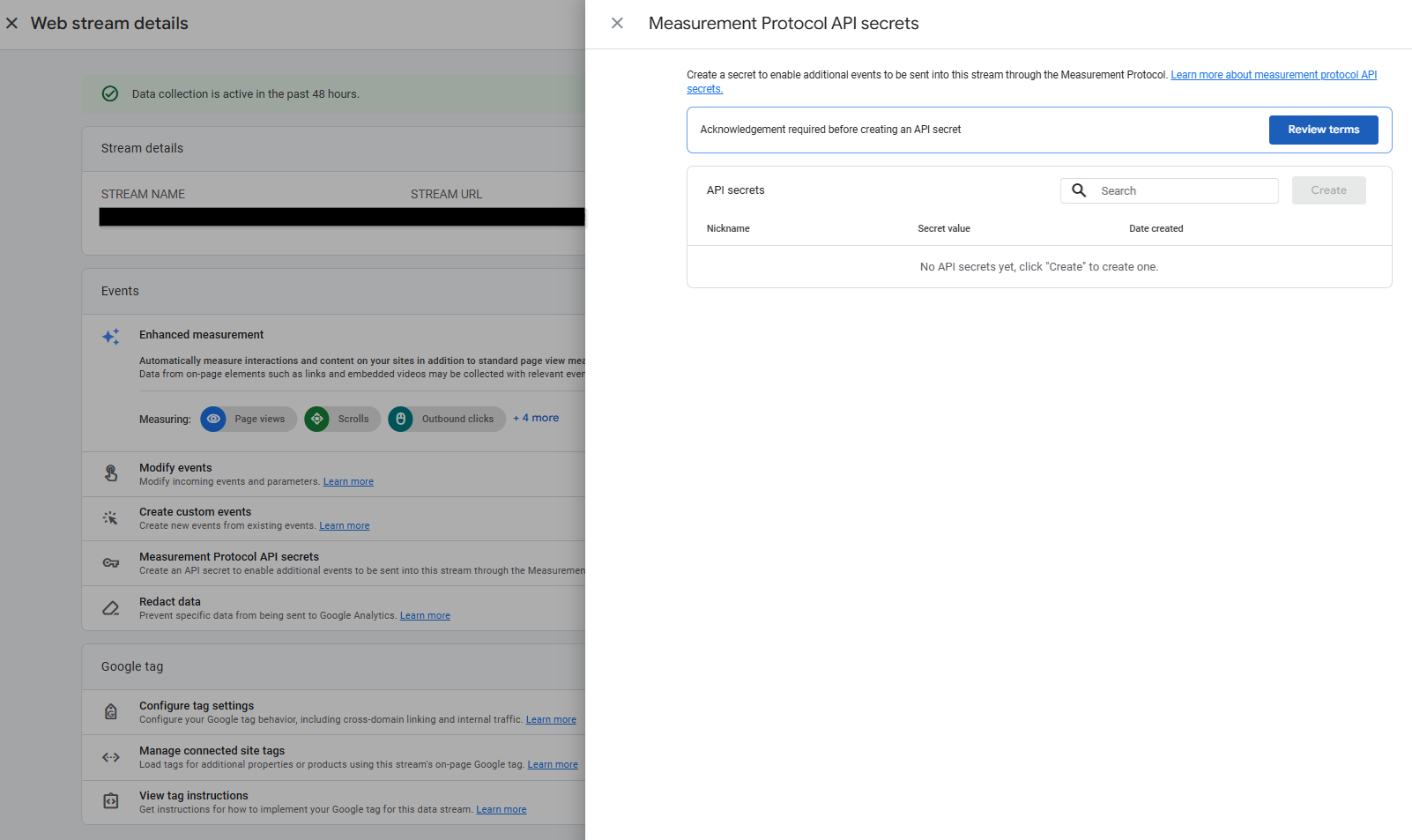
* In your GA4 Data Stream, click **Measurement Protocol API Secrets** *(you must have administrator access).*
* If required, click **Review Terms** and then **I Acknowledge** after reading the User Data Collection Acknowledgment.
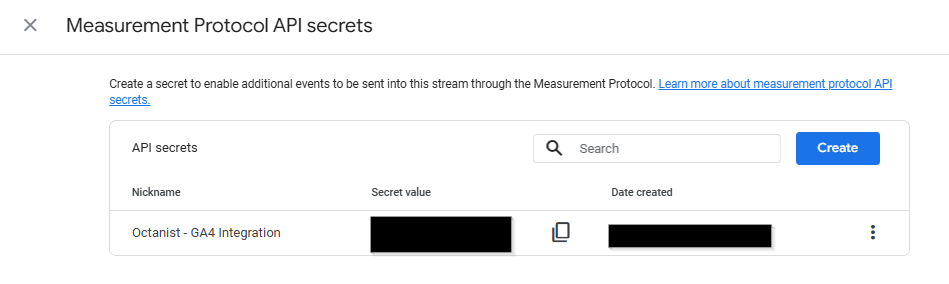
* Create a key and give it a clear name (e.g., *Octanist - GA4 Integration*).
5. Click **Create Google Analytics 4 Integration**.
Now, whenever you mark a lead as qualified, won, or lost, it will be sent to GA4 as follows:
* Qualified = `working_lead`
* Won = `close_convert_lead`
* Lost = `close_unconvert_lead`
These names follow the suggested naming conventions in the Google Analytics documentation.
## 4. Additional Reporting in Google Analytics 4
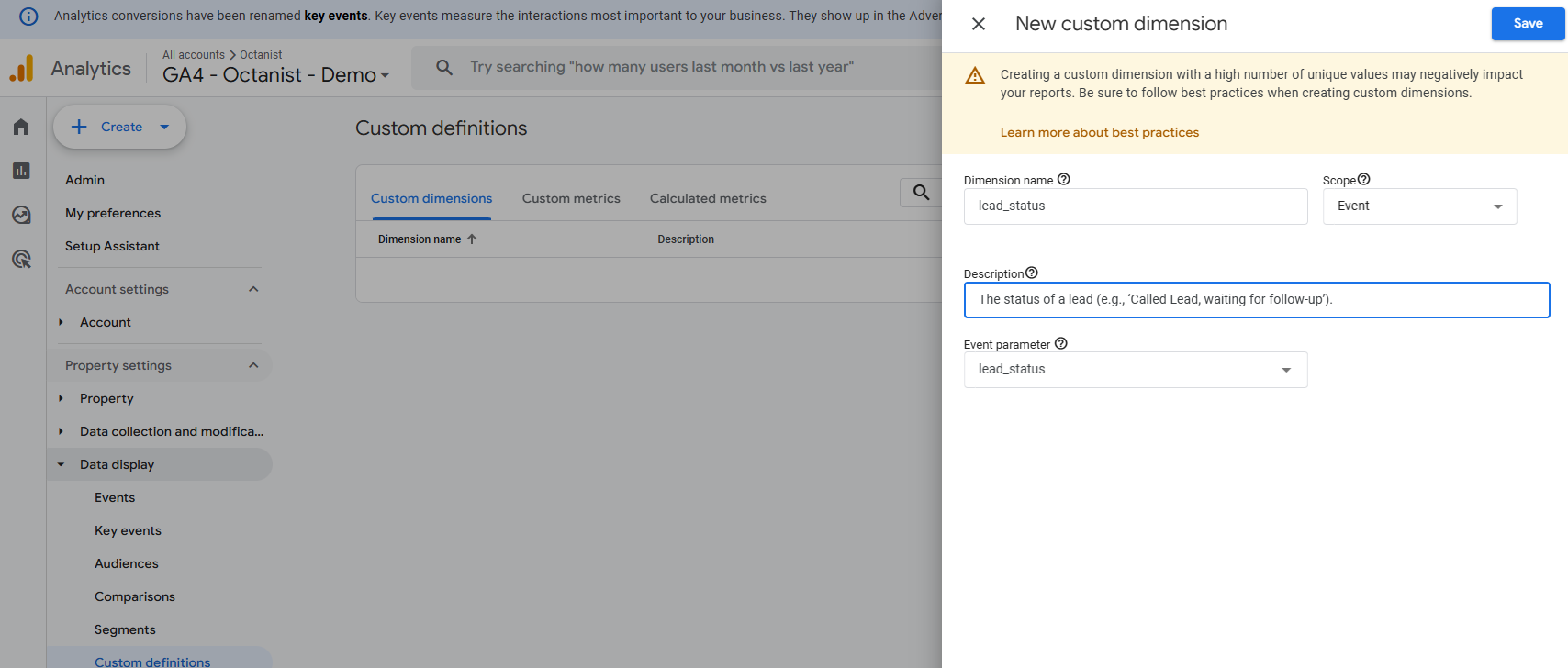
Add the [custom dimensions](https://support.google.com/analytics/answer/14240153?hl=en) `lead_status` and `unconvert_lead_reason` to view the text values of your notes entered in Octanist.
**Enter the custom dimensions as follows:**
* **Dimension Name**: The name of the dimension (e.g., `lead_status`; you can name this as you prefer).
* **Description**: A description of the custom dimension (e.g., *"The status of a lead (e.g., 'Called lead, waiting for follow-up')."*).
* **Event Parameter**: This must be `lead_status` or `unconvert_lead_reason` for Octanist Insights.
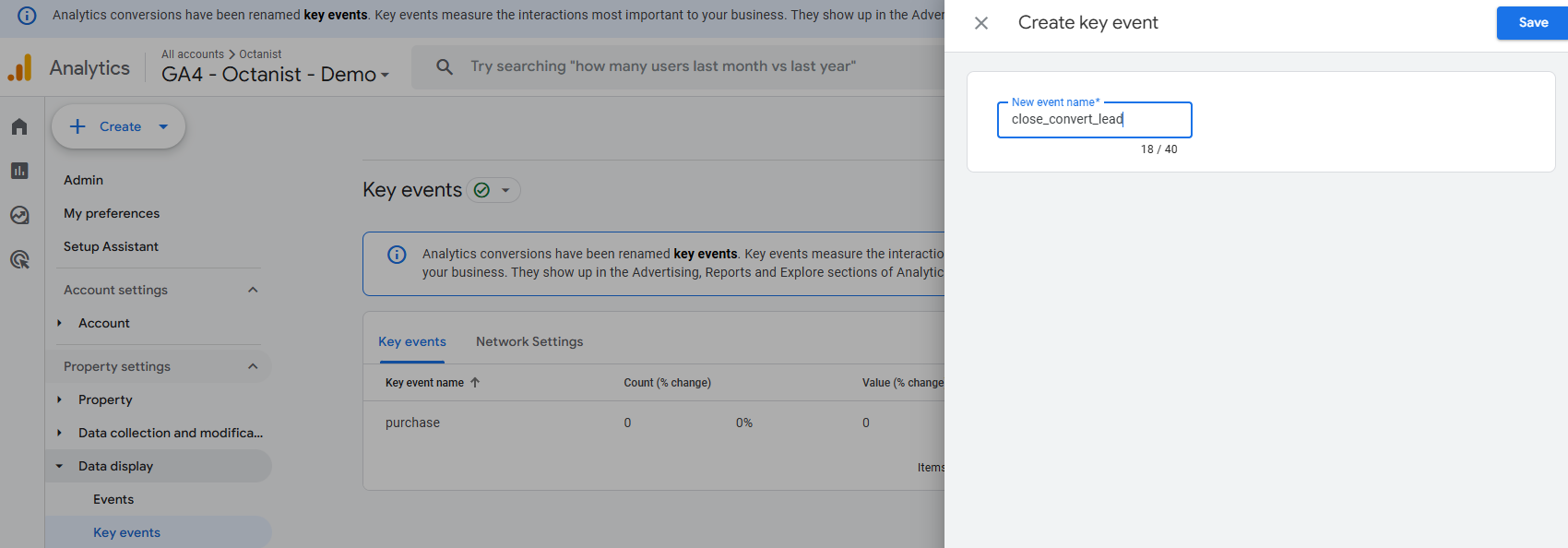
To improve reporting, mark the `close_convert_lead` event as a **Key Event (Conversion)** in GA4. This will help you better understand the user journey and simplify reporting.
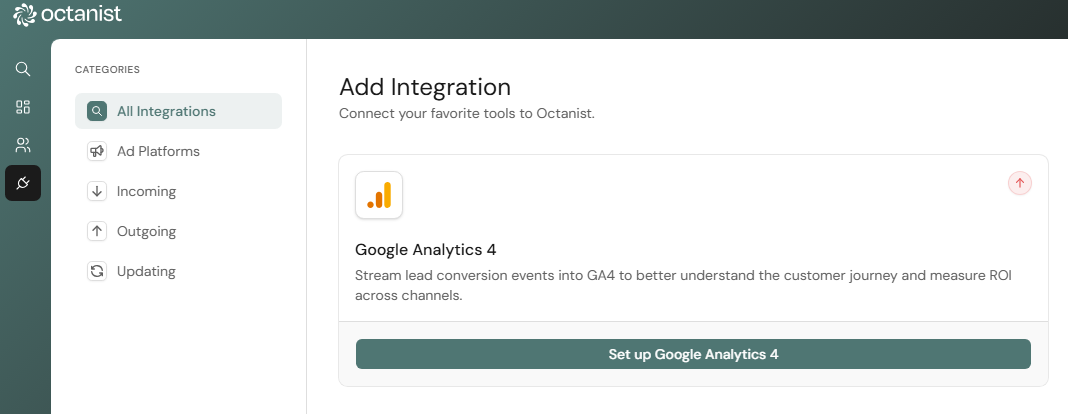 2. Add the integration by clicking **Add Integration**.
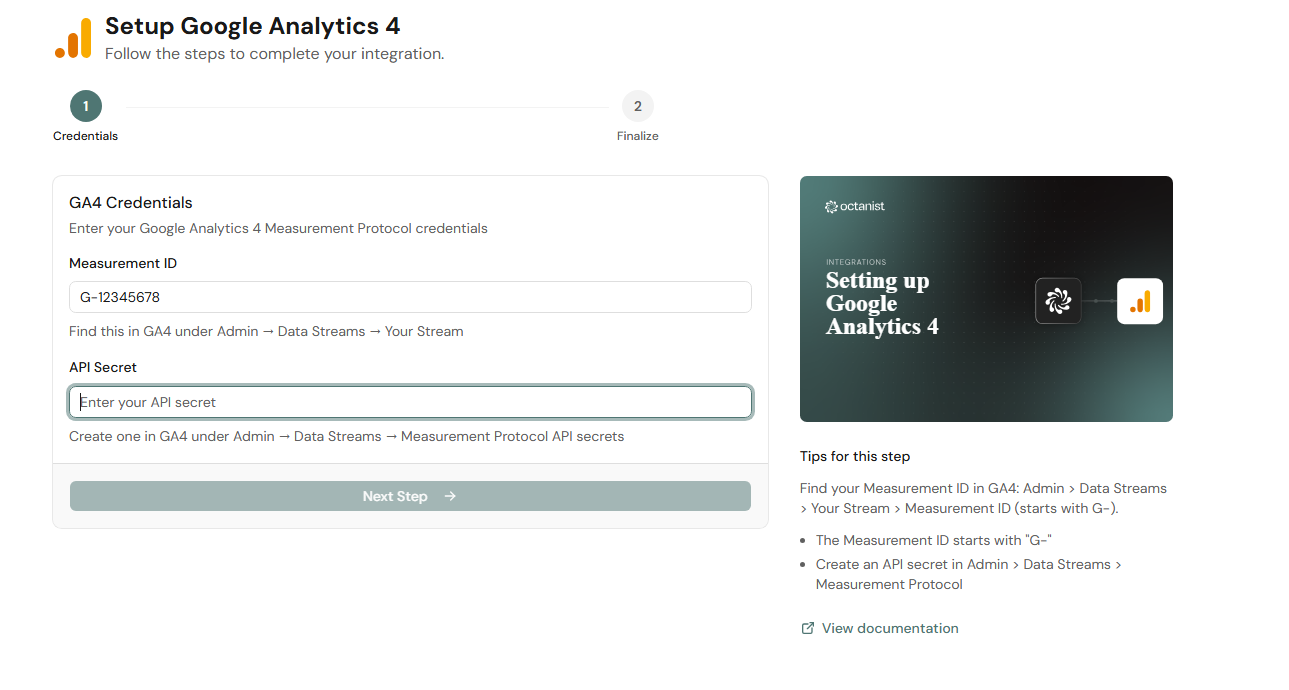 3. Enter your **GA4 Measurement ID**.
* This can be found in your GA4 account under **Data Streams**. See [Google's guide](https://support.google.com/analytics/answer/12270356?hl=en) for details.
3. Enter your **GA4 Measurement ID**.
* This can be found in your GA4 account under **Data Streams**. See [Google's guide](https://support.google.com/analytics/answer/12270356?hl=en) for details.
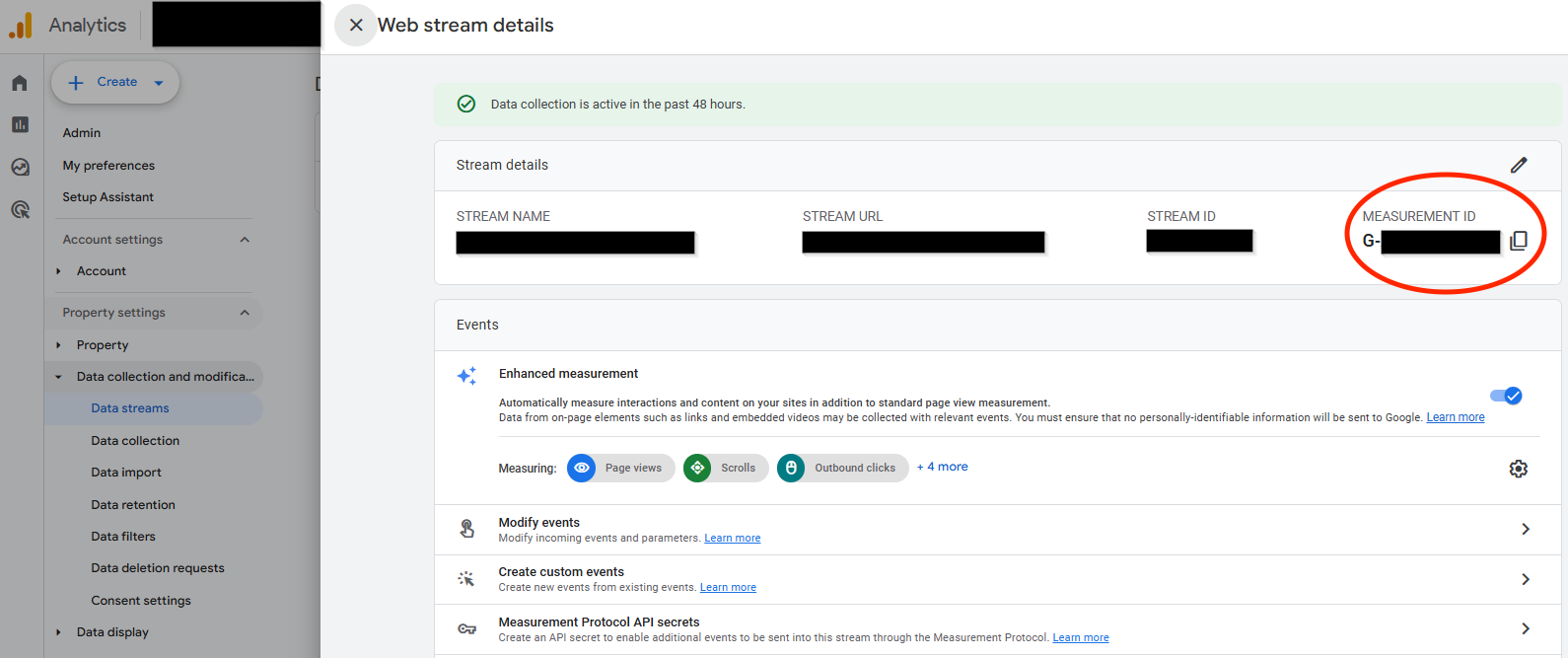 4. Enter your **GA4 API Key**:
* In your GA4 Data Stream, click **Measurement Protocol API Secrets** *(you must have administrator access).*
* If required, click **Review Terms** and then **I Acknowledge** after reading the User Data Collection Acknowledgment.
4. Enter your **GA4 API Key**:
* In your GA4 Data Stream, click **Measurement Protocol API Secrets** *(you must have administrator access).*
* If required, click **Review Terms** and then **I Acknowledge** after reading the User Data Collection Acknowledgment.
 * Create a key and give it a clear name (e.g., *Octanist - GA4 Integration*).
 5. Click **Create Google Analytics 4 Integration**.
Now, whenever you mark a lead as qualified, won, or lost, it will be sent to GA4 as follows:
* Qualified = `working_lead`
* Won = `close_convert_lead`
* Lost = `close_unconvert_lead`
These names follow the suggested naming conventions in the Google Analytics documentation.
## 4. Additional Reporting in Google Analytics 4
Add the [custom dimensions](https://support.google.com/analytics/answer/14240153?hl=en) `lead_status` and `unconvert_lead_reason` to view the text values of your notes entered in Octanist.
**Enter the custom dimensions as follows:**
* **Dimension Name**: The name of the dimension (e.g., `lead_status`; you can name this as you prefer).
* **Description**: A description of the custom dimension (e.g., *"The status of a lead (e.g., 'Called lead, waiting for follow-up')."*).
* **Event Parameter**: This must be `lead_status` or `unconvert_lead_reason` for Octanist Insights.
5. Click **Create Google Analytics 4 Integration**.
Now, whenever you mark a lead as qualified, won, or lost, it will be sent to GA4 as follows:
* Qualified = `working_lead`
* Won = `close_convert_lead`
* Lost = `close_unconvert_lead`
These names follow the suggested naming conventions in the Google Analytics documentation.
## 4. Additional Reporting in Google Analytics 4
Add the [custom dimensions](https://support.google.com/analytics/answer/14240153?hl=en) `lead_status` and `unconvert_lead_reason` to view the text values of your notes entered in Octanist.
**Enter the custom dimensions as follows:**
* **Dimension Name**: The name of the dimension (e.g., `lead_status`; you can name this as you prefer).
* **Description**: A description of the custom dimension (e.g., *"The status of a lead (e.g., 'Called lead, waiting for follow-up')."*).
* **Event Parameter**: This must be `lead_status` or `unconvert_lead_reason` for Octanist Insights.
 To improve reporting, mark the `close_convert_lead` event as a **Key Event (Conversion)** in GA4. This will help you better understand the user journey and simplify reporting.