How to use Octanist when your form is in an iframe

The Octanist pixel cannot read forms inside an iframe. Here’s the simple way to still capture those leads with the right attribution.

Ward LavrijsenWard Lavrijsen

How to use Octanist when your form is in an iframe

Some websites embed a form from another tool. That embed is usually an iframe.

The Octanist pixel on your page can still track the visit. It cannot see the form inside the iframe.

That is expected. The form lives in another document, so the pixel on the parent page cannot read the submitted fields.

Keep the pixel on your page

Install the pixel on the parent page anyway. That is how Octanist creates the session and stores attribution such as UTMs and click IDs.

The missing piece is only the form submission. You need another way to send that lead to Octanist.

Three ways to send the lead

1. You control the iframe page

If the form is hosted on a page you own, install the pixel there as well. Then Octanist can capture the form inside that page.

2. The form tool can send a webhook

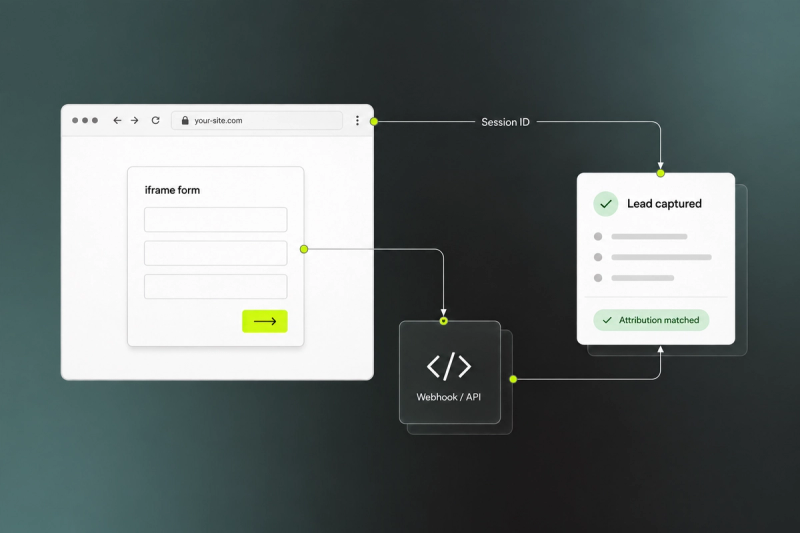
Keep the pixel on the parent page. When the form is submitted, send the lead from your server with server-side form capture. Include the octa_sid session ID from the parent page so Octanist can link the lead to the original visit.

3. The iframe can talk to the parent page

If the form can postMessage the submitted fields back to your page, call window.OCT.submitLeadForm(...) with the client-side API.

What does not work

Do not expect data-forms="true" on the parent page to capture an iframe form. The same applies to the WordPress plugin: it cannot hook into a form that runs in another document / web page.

When to contact support

Iframe forms are not supported out of the box. If the form provider cannot send a webhook, a redirect, or postMessage data back to your page, contact support and we can look at a custom setup.

More from the blog

ProductSep 3, 2026

How to Set Up Meta Offline Conversion Tracking and Optimise for Sales

Learn how to send qualified leads, offline sales and revenue back to Meta, then use these signals to optimise your campaigns for customers, not just form submissions.

Centralize Lead Qualification with Zapier & Octanist
How-To GuidesNov 28, 2025

Centralize Lead Qualification with Zapier & Octanist

Using Zapier with Octanist, you can centralize leads from multiple sources, qualify them in one place, and send offline conversion data to advertising channels.

How to set up Customer Match Lists for Google Ads using Octanist
How-To GuidesSep 30, 2025

How to set up Customer Match Lists for Google Ads using Octanist

Learn how to use Customer Match Lists in Google Ads and Meta to improve targeting, cut ad spent, and increase conversions with Octanist’s BigQuery integration.

Click ID Removal in iOS 26: The impact on your (Offline) Conversion Tracking
StrategySep 15, 2025

Click ID Removal in iOS 26: The impact on your (Offline) Conversion Tracking

Discover the impact of Click ID removal in iOS 26 on (offline) conversion tracking and how to adapt with Enhanced Conversions and server-side solutions.

Google Analytics Offline Conversions: Track Sales & Converted Leads with GA4
How-To GuidesSep 6, 2025

Google Analytics Offline Conversions: Track Sales & Converted Leads with GA4

Learn how to track offline conversions in Google Analytics 4 (GA4). Discover the Measurement Protocol, BigQuery and Octanist to connect CRM sales data, attribute offline revenue, and improve campaign reporting.

Enhanced Conversions in Google Ads: Web vs. Leads Explained
How-To GuidesSep 6, 2025

Enhanced Conversions in Google Ads: Web vs. Leads Explained

Learn the difference between Enhanced Conversions for Web and Enhanced Conversions for Leads in Google Ads. Discover how Octanist helps you track more conversions, connect offline data, and optimize campaigns with first-party data.