

What the pixel captures
The pixel sends these signals to Octanist:- Page views and session activity
- Landing page, path, referrer, device, country, and user-agent context
- Click IDs such as
gclid,gbraid,wbraid,fbclid,msclkid,li_fat_id,ttclid,twclid,rdt_cid, andsccid - UTM parameters such as
utm_source,utm_medium,utm_campaign,utm_content, andutm_term - Consent state, when it can be detected
- Form submissions, when form auto-detection is enabled
Get your installation script
- Open Octanist.
- Go to Settings > Tracking.
- Copy the pixel script.
- Install it site-wide, preferably in the
<head>of every public page.
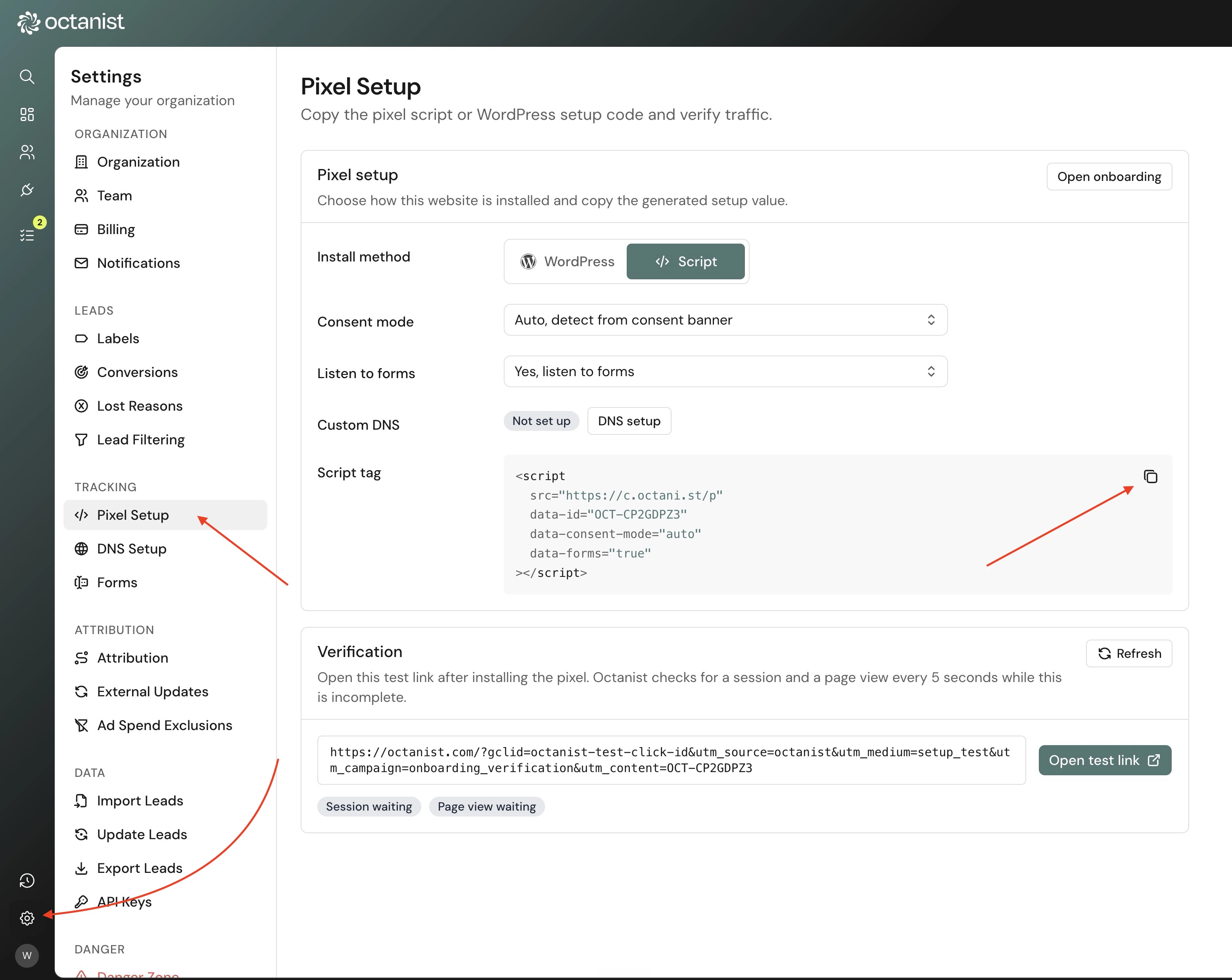
OCT-XXXXXXXX only with the measurement ID shown in your Octanist account. Do not reuse a measurement ID from another organisation.
Checkout, cart, basket, and payment pages are skipped by default. To capture lead forms on those pages, add data-checkout="true". See Checkout pages.
Script attributes
Consent mode
Usedata-consent-mode="auto" unless you have a specific reason to choose another mode.
For more detail, see Consent mode.
Form capture
Whendata-forms="true" is present, the pixel can detect simple lead forms in the browser. This is useful for non-WordPress websites where server-side form hooks are not available.
For WordPress websites, the WordPress plugin is preferred because it captures supported form submissions server-side. Server-side capture is usually more reliable for AJAX forms, captcha-protected forms, and theme/plugin combinations that change browser behavior.
If your site needs to send a form submission from custom JavaScript, use the Client-side API.
Checkout pages
By default, browser-side form auto-detection does not run on checkout, cart, basket, or payment pages. Page views, sessions, consent, and the hiddenocta_sid field still work on those pages.
This skip is intentional. Checkout pages often contain payment forms, account creation, or other fields that should not become leads.
To capture lead forms on those pages, keep data-forms="true" and add data-checkout="true":
- Login, account, register, and admin pages stay skipped.
- Forms with a password field stay skipped.
- Payment fields such as card number, CVC, IBAN, and similar sensitive keys are still ignored.
- Individual forms can still be excluded with
data-octa-ignore.
data-checkout="true" only enables automatic browser-side form detection on those paths. The Client-side API can still send a checkout form manually without this flag.
The skipped checkout paths are page paths that start with /checkout, /cart, /basket, or /payment. Paths such as /en/checkout are not skipped by this rule.
Exclude a form from automatic capture
Adddata-octa-ignore to a form when the pixel should not automatically capture that form:
window.OCT.submitLeadForm(...) manually after a successful submission.
If a checkout form should not become a lead, keep the default pixel setup without data-checkout="true", or add data-octa-ignore to that form when checkout capture is enabled.
data-octa-ignore only disables automatic form capture for that form. It does not disable page views, session tracking, consent handling, or the hidden octa_sid field.
Server-side form capture
Use server-side form capture when browser-side form detection is unreliable, blocked by another script, or not appropriate for your form stack.Custom DNS
Most websites can use the default Octanist pixel domain. If you want to serve the pixel through your own subdomain, see DNS setup.Form mapping
When Octanist detects a new form, you may need to map its fields before submissions become leads. See Form mapping.Debugging
Use the Octanist Debugger when you need to inspect whether the pixel, consent state, dataLayer, and form detection are working on a page.Custom tracking domains
Most websites can use the default pixel domain. If your account uses a custom tracking domain, Octanist will show a script with that domain instead ofc.octani.st.
Custom tracking domains should be installed exactly as shown in Octanist. Do not change the src host manually unless support has confirmed the domain is active.
Verify the install
- Publish the script on the live website.
- Open the live website in a new browser session.
- Submit a test lead form, if form tracking is enabled.
- Return to Octanist and check the setup status and lead list.